How to Build Simple Productivity Systems
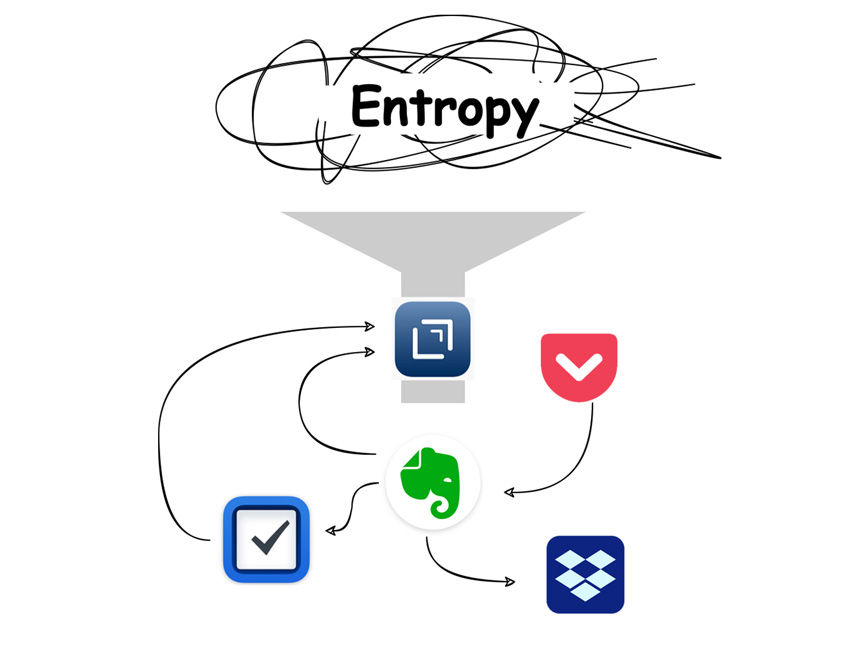
Generally, productivity systems refer to a certain technique or method for completing tasks faster and in larger quantities over a set period of time. It is a common misconception to call methodologies like Getting Things Done, “eat the frog”, Pomodoro, or Eisenhower Matrix “a system”. In reality, they are rarely comprehensive, covering only one or a few aspects of personal productivity instead.
For this post, I want to give a different definition of the productivity system – a combination of techniques and tools that increase one’s general effectiveness. Notice that we are talking about a combination of techniques and tools. You cannot get a Pomodoro timer and say that this is a productivity system. You can try it, but I’ll judge you for that.
Let’s focus on building the actual system that can combine several techniques and core tools that complement them.
Building blocks of any productivity system
Any productivity system boils down to managing information. The only difference is the type of information that you manage:
- General knowledge
- Projects and project-related information
- Action items/tasks
We aim at building a system that can effectively deal with all three of them.
Other requirements are:
- Ability to handle large amounts of information. For most of us, life is multifaceted, and there’s always more on our plates than we can handle. A productivity system you’re building should be future-proof. It should handle potentially infinite amount of information without losing efficiency. If your system can handle only a few projects and then starts to fall apart, better rethink it. Do you even need a system to manage two-three personal projects? If you’re only starting out, don’t worry too much about it. Just make sure to adapt and change the system as it starts to hold more and more information.
- Effective handling of incoming information. The system should be flexible when dealing with various information that is thrown at you every day. For example, using a cabinet and folders can become a bottleneck if you have a lot of digital information.
- Low-maintenance. The rule of thumb is dead simple – if your system requires significant effort to maintain, you will not use it.
- Don’t fall into cargo cult. Use your best judgement when deciding to incorporate a new methodology or tool into your system. Be especially careful if it involves significant effort or financial investment. Switching tools because your favorite YouTuber made a new video is generally not a good idea.
General knowledge management
We all have information that is not directly related to any specific project, but could become useful in the future. Utility bills, emails, recipes, and hundreds of other things in varying formats and sizes, digital and physical. Storing all that in memory is impossible unless you can query your memory like a database. But, ditching it could mean wasting time or losing opportunities in the future. Thus, you need a way to store a potentially infinite set of heterogeneous data and be able to find a piece of information when it’s needed.
To be effective, a general knowledge management system must meet a few of the key requirements:
- Putting information for storage should be as quick and effortless as possible.
- Have ordering (simplest option is alphabetical order)
- If this is a digital system, information in it should also be searchable.
- The system shouldn’t limit the amount of information stored in it, or at least be expandable (this is mostly an issue for physical storage).
- Additionally, pieces of information in the system can be labeled based on their properties or topics. But, be aware of increased maintenance effort.
Project and project-related information management
Projects exist not only in the world of real estate and software development. Following the definition of a renowned productivity guru, David Allen:
Projects are defined as outcomes that will require more than one action step to complete and that you can mark off as finished in the next 12 months.
Moving a house is a project. Enrolling your kid in a school is a project. Writing this blog post is also a project. Project management means having control over the big picture of your commitments and global outcomes. For managing specific actions that drive the project forward, see the next section.
A project management system should give a high-level overview of the health of your current projects and their deadlines. Apart from that, it is useful to have a definition of doneness and a desired outcome for each project.
You can manage project-related information in the same way you manage general knowledge. Just make sure to keep supporting materials in relevant places for each project.
Task management
To move any initiative towards completion, you need to perform certain actions. This can anything from calling a doctor to writing the outline of a book. Keeping track of these tasks in your mind is a bad idea (again, unless you can query your memory to get exactly the task you need to do right now). Effective task management ensures that you can quickly come down from the bird’s-eye view to concrete next steps for the given moment of time.
For me personally, tasks used to be the hardest thing to manage due to the constant dilemma – how detailed should I be with my task breakdown?
Say you want to bake a cake. Technically, this is a project since it requires several steps (buying ingredients, preparing, baking, etc.). Your to-do list for the “cake project” could look like this:
- Get ingredients
- Bake the cake
Or like this:
- Look for the recipe on the Web
- Print the recipe
- Buy ingredients
- Buy flour
- Buy sugar
- …
- Decorate the cake
- Put the cake in the fridge
Both examples are valid depending on the kind of person you are and the project you are planning. The task breakdown can be as high-level or as detailed as you wish. The only thing to guide you here is common sense.
Yet, an effective task management system should also satisfy some requirements:
- You should be able to quickly and effortlessly add new tasks from a variety of sources (sometimes an email is an actionable item).
- It should effectively handle potentially countless tasks from different projects and life areas. This is the hardest part, since it heavily relies on the nature of your work and personal life.
- Ideally, it should be multi-platform. By using a paper planner or software that is supported only on one platform, you are bottlenecking yourself to a certain degree. When doing so, you must be confident that the tradeoffs are worth it.
My current system
After trying countless methods and apps, I’ve settled down on the next methodologies and apps.
Disclaimer: This is not sponsored. The selection of tools in this section is based solely on my experience and current needs. I am not affiliated with any of the companies that have created these products. I may include referral links for some services. By clicking on them, you’re losing nothing (and sometimes can even get a bonus) while showing your gratitude for this post.
Methodologies
Getting Things Done
The backbone of my whole system is the Getting Things Done methodology. I’m not following it religiously, only taking core principles and techniques instead. I use an inbox for incoming “stuff”, process this “stuff”, and do a weekly review to keep projects and tasks in check.
So far, this is enough to get me going through most of my daily tasks, work and personal projects. Yet, I constantly look for something new to incorporate into my “methodologies” category.
Tools
Drafts
Drafts is an app for quickly capturing and processing notes. It provides integrations, so you can send your, well, draft to other apps and services, such as Evernote, Twitter, OneNote, Google Drive, and others. It also has markdown and backlinks for taking your notes a step further.I use Drafts as an inbox for thoughts and a temporary scratchpad. Most of my ideas are born and incubated here before being transferred to a different app for long-term storage. An alternative could be any note-taking or word-processing app.
Evernote
Evernote is THE note-taking app. Despite the turbulent past few years, it’s still one of the best options on the market, especially considering a relatively generous free plan. I’ve been using Evernote since 2013 and, after trying dozens of other note-taking apps, came back to it once again. Alternatives for Evernote are: OneNote, Notion, Bear, Apple Notes, and dozens of others. Some apps lean towards being feature-rich, others aim to be minimalist and focus on plain note-taking. The choice is yours.
I use Evernote for managing general knowledge and project-related information (bookmarks for relevant websites, PDFs, meeting notes, etc.).
My notebooks are structured into a few stacks:

To be able to quickly find necessary information by topic or kind (or their combination), I use a hierarchical tag system. I also have tags for areas (personal, work) and people (this is mostly used for meeting notes).

Pocket is the “read later” app. Despite an absolutely useless yet annoying premium plan and the abundance of competitors, it’s still a nice and simple way to store those Sunday reads in their cozy little place without interfering with your main system. Alternatives: Instapaper, GoodLinks, and the “read later” feature in most browsers.
I use Pocket as an inbox specifically for things I want to read and, maybe, store for reference later. The top feature for me is how well Pocket processes articles and removes distractions like ads or those dreaded cookie popups. When I’m done, I either archive the post, delete it or send it to Evernote for archiving.
Things 3
Things is a simple and well-thought-out task management app. And don’t let its minimalistic design deceive you. When I say “well-thought-out,” I really mean it. Things includes many subtle features, such as the ability to set a task’s planned date and deadline separately, as well as areas for grouping multiple projects and tasks. Once you get friends with Things, it becomes a trusty companion in your daily work.
The only downside, in addition to it being available only on Apple devices, is the price. Apps for macOS, iPadOS, and iOS are sold separately. The price goes down from $49.99 to $19.99 and $9.99 for each version, respectively. In total, a rather minimalistic task manager will run you about $79.97. OmniFocus for Mac costs $99.99 for a lifetime license, while being a sophisticated GTD tool for seasoned professionals and productivity gurus. On the bright side, you don’t have to deal with an ugly subscription model and can buy each app gradually. So far, I’m sticking to an iPad + iPhone combo, putting off buying the Mac version until I’m confident that Things is my thing.
There are plenty of alternatives with varying pricing and functionality, but most of them are easily interchangeable (unless you have developed a very specific task management system that revolves around the features of a particular app). Todoist, Remember The Milk, OmniFocus, Microsoft To Do – you name it.
I use Things to manage both tasks and projects. Most of my projects are not complicated, so Things + Evernote combo works perfectly for keeping deadlines and reference material in check.
And speaking about simplicity, here’s how my next actions list looks in Things:

Today’s view:

Notice the subtle touches like a project name under the task name and calendar meetings displayed as an agenda instead of being converted to tasks like many apps do.
Dropbox
To store and manage large files, I use Dropbox. My folder structure partially mirrors Evernote stacks and notebooks hierarchy, with a separate folder called Projects, which contains supporting files (e.g., images for posts) in respective subfolders.
My main reasoning behind choosing Dropbox was breaking away from Google’s ecosystem and ditching as many Google Services as possible. I’d rather pay with my money than with my privacy.
Plus, Dropbox has grown into something bigger than just a cloud storage provider. Now it has services like Transfer for sending large files without storing them on your drive or Paper – a collaborative document editor with support of media embeds from different apps. They aren’t fully a part of my system yet, but I’m actively exploring their benefits.
As with task managers, there are dozens of cloud providers, including Google Drive, OneDrive, Box, iCloud, and others.
By signing up with my link, you will get 500 MB after installing the desktop app.
How to build a simple and effective productivity system
Incoming information is one of the biggest contributors to mess and stress in your daily life, so decide how you are going to deal with it. Create an “inbox” that will gather everything that might need your attention later. This inbox should be both for external triggers (emails, unpaid bills, etc.) and internal triggers (thoughts, ideas).
Despite David Allen’s Getting Things Done methodology has been actively criticized, its influence on the modern intellectual work landscape is enormous. The concept of an inbox for incoming “stuff”, for example, was introduced and popularized by David Allen. If you look at any task manager today, it will have a dedicated section called Inbox. The same goes for “someday/maybe” and many other tricks introduced in Mr. Allen’s book. However, GTD was initially designed to be a high-maintenance and strict system, which has put many people off. Yet, this shouldn’t prevent us from taking the best of this and other systems and adapting their building blocks for ourselves.
Now decide what to do with this information. Is this general knowledge that you want to store for later or an actionable task? Perhaps it’s a project? Process and store it accordingly.
Gathering and grouping information based on its purpose and type is already enough for many people. It can serve as a solid foundation for anything you plan to do next. Once you have this foundation, start improving each of the building blocks separately, implementing changes step by step. How can your knowledge management be improved? Is there anything you need in a project management system? How can you sort and group tasks more effectively? Read and learn about each of the aspects. There’s always room to improve.
I am purposefully omitting details like prioritizing tasks or choosing metrics to track in a project. A productivity system must be yours and only yours. Copycatting others’ approaches never brings the desired results. Start with a solid foundation and understand the landscape in which you are acting as well as the nature of the information you are dealing with. Then slowly build on top of it.
Don’t get too carried away with shiny new tools, but be open to experimenting and trying new ones. Always spend the proper time to learn the tools you are already using. Every so often, they hide plenty of pleasant surprises that can improve your productivity drastically.
Productivity in general is about doing things faster and producing more output per unit of time and effort. Look at your system closely and think about what can be done more efficiently. What can be automated? Discarded? What if, instead of checking every single receipt in your inbox, an automation gathered them into a special folder and sent a reminder to review them at the end of the month? Maybe you could take it a step further and make an automation that generates a spreadsheet from all of these receipts? How much time would it save you?
Occam’s razor or why you shouldn’t over-engineer your system
Occam’s razor, also known as the law of parsimony, states that one should favor simplicity over complexity. The simplest solution is usually the best. The system you’re building shouldn’t be overly complex just for the sake of it if the result is the same as when using a simpler system (or not using one at all!).
Here’s a wonderful example that illustrates two points: know your tools, and complex doesn’t always mean better.
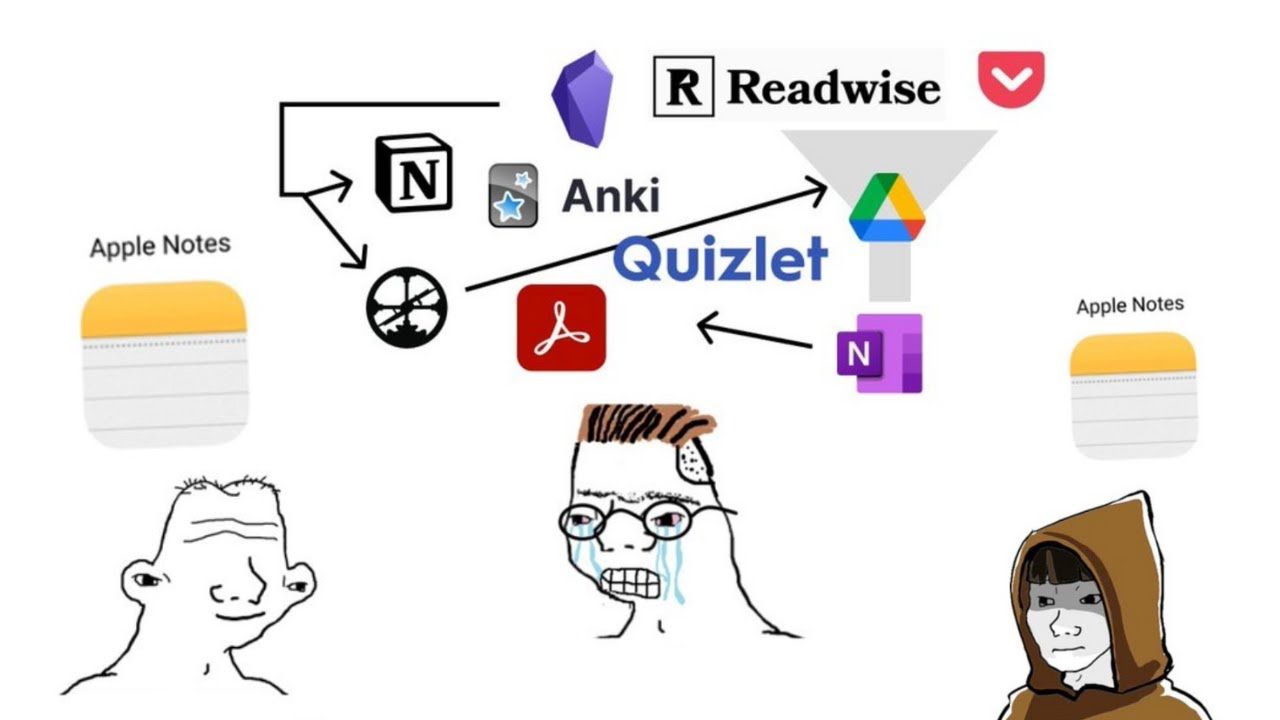
The system in the middle is full of integrations, moving information back and forth between different apps. Yet, one can achieve similar or even better results using something as simple as Apple Notes. All the while, some simpleton will use the same app and accomplish nothing.
I’ve gotten caught in the trap of overcomplicating things many times. Here’s the latest example of my experience with a task manager.
Right after coming up with an idea for this post and starting to work on it, I’ve decided that it would be a good idea to switch things up and refresh the task management part of my system. For the last three months, I’ve been using Remember the Milk and even paid for the yearly subscription. Here’s what my next actions list looked like.

The only meaningful tag here is “next” – it means that this is the task I’ll be doing in the near future. All the rest (“offline”, “focus”, “computer”) is my attempt at implementing a context system to filter tasks depending on the state I’m in (focused/braindead) or the device I’m on (tablet/computer/phone). I’ve used this once or twice in the first week and then just forgot about tags and stuck to the next actions list. But I still spent the time assigning meaningless labels to each task. Productivity is about removing friction, so don’t create obstacles in your own way.